Support this site!

Showing posts with label Firefox. Show all posts

Tuesday, December 16, 2008

10 Unique Desktop Wallpaper sites you gotta' see!

Hey!  If you're at all like me, you spend a little time each week tweaking your computer desktop by cleaning it up a little and changing the decorations.  I'm always on the lookout for cool new desktop wallpapers.  Recently I've stumbled upon a few new sites that have prompted me to share this article with you.  I'll also share some of my old favorites.

Ok...I've got the glue, the brush and my old overalls...where do we start?

Umm...ok....  Hey!  Put the wallpaper paste down!  Quit eating it!  It says "wheat paste", but that's no reason to eat it!  Yuck!  I'm talking about your COMPUTER desktop!  Ok.  Now, let's check out some cool sites.


Interfacelift.com

This one is my favorite.  I use this site quite a bit and my students do as well.  Good clean high quality wallpapers for everyone.  My only beef with the site is I wish I could see more wallpapers at a time, but I can live with it.  They have wallpapers for nearly every screen size.  Interfacelift also features icons and themes as well!  The icon sets are very nice.  One really great thing I like about this site is the ability to download "mobile device" wallpaper.  They feature wallpaper sizes for the Nokia n800/810 Internet Tablets, the Apple iPhone, Sony PSP, and ordinary cellphones.  Gotta' admit, that's pretty cool!  Check out Interfacelift here!


Caedes Desktop Backgrounds

You can get lost in this site.  There are so many wallpapers that you can spend days looking around trying to find the right one.  Luckily the site is broken down into categories and you can sort by screen size and shape.  the illustrations range from artistic fantasy to photographs...and everything in between.  Check out Caedes Desktop Backgrounds here.


DualScreenWallpaper.com

Are you one of the lucky folks who spend your days gazing at a large desktop that spans two or more monitors?  If so, you've probably wondered how you could get wallpaper that "makes sense" on a multi-screen setup.  Well, now you can!  Dualscreenwallpaper.com has just what you may be looking for.  They have sizes ranging from ultra-huge to a modest 1280x800.  Go to dualscreenwallpaper.com for more details!


GraffitiWallpaper.com

This site is amazing.  In case you haven't figured it out, I don't go for the typical movie/celebrity/same wallpaper everyone else has type of web site.  I'm looking for more unique wallpapers and sites.  Graffitiwallpaper.com fits the bill.  The site is very well laid out and easy to navigate.  The name kinda' implies that this site is all about graffiti, but that's not the case.  There are some "graffiti" images, but most of the images are simply animals, landscapes, food, and other unique objects. Check out the site here.


Customize.org

I had to add this one simply due to the name and the sheer number of wallpapers to choose from.  Customize.org features over 15,000 wallpapers for you to choose from.  There's something for everyone.  This site is primarily user driven in terms of submissions and ratings.  You can even select wallpapers according to a color scheme!  Customize.org Wallpapers


N-Design Studio

If abstract designs from original artists are your thing, then check this site out!  N-Design Studio has a small, yet awesome, selection of images created by some very talented artists.  Check it out!


Veer

Similar to N-Design Studio, the Veer site offers a moderate selection of really cool wallpapers that seem to invoke a "retro" feeling that harkens back to the 70's and Peter Maxx.  If you're a fan of active abstract art or a mix of digital photography and graphic arts...check this site out.


IW

I'm a fan of 3D graphic arts.  This site is really cool.  The artists are very talented.  Although the selection is small, the graphics are so well done that it's worth a look.  Go here to see what I mean.


David Lanham

David Lanham is very talented (and busy) grahic artist.  He has several of his works posted for all to enjoy.  I find many of the illustrations on the site to be kinda' like "cartoonish abstract" for lack of a better description.  This is one of those sites you should plan to spend a few minutes on.  I found myself clicking link after link just trying to see what the next one looked like.  Click the icons on the left side of the page to find the wallpapers.  (confession:  I downloaded the snowman one *the cherry icon*)  Check out David Lanham's wallpapers here.


wallpapr

Wallpapr leverages the power of Flickr, the popular photo site, for gathering thousands of unique wallpapers in one spot.  You can browse as little as 20 or as many as 100 at one time.  The selection is HUGE.  You'll have fun browsing this one.  Wallpapr


So...now that I've given you some great sites to browse, hopefully you can redecorate that ugly desktop you've been staring at for a few months.  Time for change!  Enjoy!  Hey!  If you have a fave wallpaper site that isn't featured here...share it in the comments!

Read more...

Saturday, December 13, 2008

Take the edge off your noisy environment...free white noise!

I recently blogged about a website called iSerenity.com which is a great site for grabbing a little peace for your busy day.  In the course of my research I learned about one home office worker who uses "white noise" and "pink noise" to work in virtual silence.  His claim is that eventually the human ear/mind will block out or ignore the white noise and leave you in virtual silence.  I haven't tried it that long, but I can say that it's a bit "trance-inducing".  I find myself being able to relax without having the urge to pee (like I do when I listen to the "babbling brook").  Sometimes just having light noise can make it much easier to concentrate than nothing at all.  Definitely worth a try...check it out!

Free white noise! - White Noise MP3s.com - Because tinnitus sucks.


, , , , ,

Read more...

Wednesday, December 10, 2008

Show your parents, friends, and co-workers how to "Google" it

  You know you have all had to do it.  What?  Show folks how to "Google" something.  You try hard not to make people feel silly, but sometimes it's unavoidable.  Now there's a web site that can take care of all of that for you.

Yeah!  I get sick and tired of people asking me too many questions especially when they could just "Google" it....tell me more!

Finally someone came up with a way to deal with this annoying behavior.  It's a site called Let Me Google That For You.  If you've had enough...use this fun, and a bit "snarky", site to teach them how to "Google it" themselves!  The site is very easy to use.  You simply enter the search term, click the Google Search button, and a link shows up at the bottom that you can copy and send to your friend, relative, or co-worker.  It will display an animation walking them through the search and then it actually displays the search results.  Hopefully, this will help you get some of those annoying folks off your back.  After all, using Google is simple and should be something everyone knows how to do.  :-)

Let me google that for you

Read more...

Tuesday, December 9, 2008

5 Google Docs Templates for Xmas!

Hey!  Google Docs is not only convenient for working online and making life easier...it can also help you with preparing for the holidays!  Google Docs templates are useful every day, but here are some that are particularly useful for this time of year!  Check 'em out! 

Top 5 Google Docs Templates for Christmas


, , , , ,

Read more...

Monday, December 8, 2008

ClassMarker "The online test generator"


The ClassMarker website is a professional online quiz maker for use in schools and organizations.  The website is simple to use and an effective way to administer quizzes directly from your website or emails.  You can randomize questions, have quiz results emailed to you, and create all different types of questions like true/false, multiple choice, and fill in the blanks.  ClassMarker has a free and a paid version.  The paid version offers more features such as the ability to add feedback, removal of advertising, and priority email support.

Try an online quiz here!


Create online quizzes free quiz maker Online testing ClassMarker

Read more...

Friday, December 5, 2008

Share files and photos, create backups...all in a FLASH!

Imagine this scenario...

You have an awesome movie that you want to share with your friends.  You think, "I could email it to them!"  Whoops!  Your email provider has a 10mb limit for attachments.  Dang!  Now what?  Hmmm...

Enter...Drop.io

Drop.io is the simplest way to share files, photos, and more online!  Check out the video below and I'll show you how it all works!


Visit drop.io and start sharing your files and photos!  Click below!

drop.io

Read more...

Tuesday, December 2, 2008

Making web pages into "clickable" apps

Good day everyone!  Today I'm going to show you how you can make any web page into a quickly accessed application on your desktop, dock, or other launch panel.

Ok...let's get on with it!  Ooh!  Is that a rainbow I see?


Actually no.  Yes...it's Prism...not the triangular glass thingy, but rather, the good folks from Mozilla have created an excellent project called Prism that allows users to create "mini-browsers" specifically set up for individual web pages. 

From the Mozilla wiki page:

Prism is a simple XULRunner based browser that hosts web applications
without the normal web browser user interface. Prism is based on a
concept called Site Specific Browsers (SSB). An SSB is an application
with an embedded browser designed to work exclusively with a single web
application. It doesn’t have the menus, toolbars and accoutrements of a
normal web browser. Some people have called it a "distraction free browser"
because none of the typical browser chrome is used. An SSB also has a
tighter integration with the OS and desktop than a typical web
application running through a web browser.

Ok...wonderful.  So what?  How does this help me?

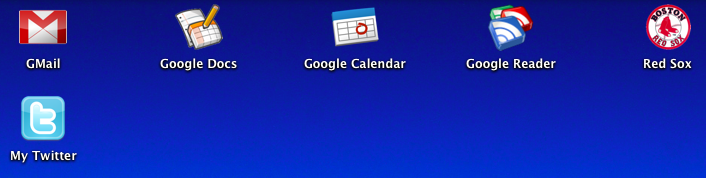
Think of it this way.  Perhaps you use GMail as your primary email or even Google Calendar?  How about Playlist.com and the standalone music player?  Prism and the Firefox add-on Prism for Firefox make it easy to "isolate" these web sites as "apps" so you can quickly and easily access them.  In the following screenshot you can see how I've actually made several "apps" on my desktop, each of which use Prism to launch a specific web site for quick and easy access.  (yes...I'm a die hard Red Sox fan too)


Pretty cool!  Ok...how do I do this?  Go easy on me...


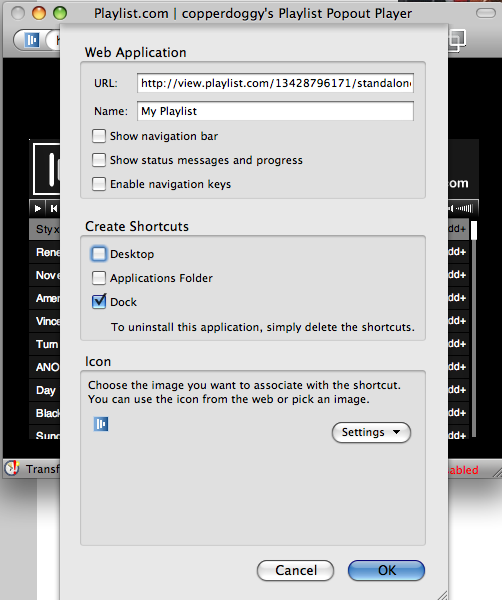
Sure!  It's actually pretty easy.  The easiest method is to use the Prism for Firefox extension...sometimes also referred to as Prism refractor for Firefox.  Use the link below to go to the installation link.  Install just like any other extension and then restart Firefox.  Once you have restarted, you should see a new menu item located under "Tools" that says "Convert Website to Application".  Browse to the site you wish to make into an "app".  In my example, I'm going to browse to www.playlist.com and go to my playlist.  I'll launch the standalone Flash Player.  Once the Flash player is open, I'll click "Tools" > "Convert Website to Application".  The next shot shows what that looks like:


You can choose to add icons to your desktop, dock, or applications folder.  NOTE: This example was created using OS X...other platforms may look a little different and have a less options.  (the Linux version only offers the "desktop" option)

Dude!  That's awesome!  Thanks for the tip!  So...what does it look like in the end?


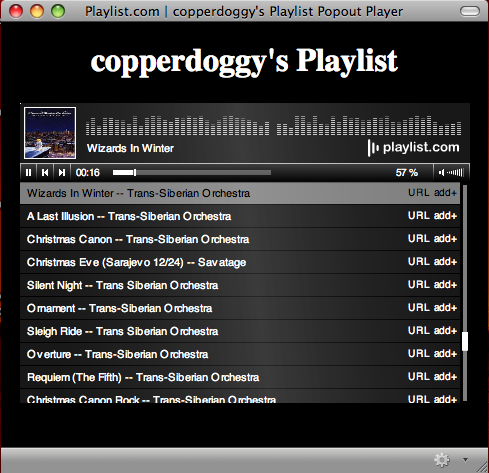
You're welcome!  Here's the shot of my playlist using Prism in all its glory!


Notice the Holiday tunes!  Enjoy the holiday season and let me know if and how you were able to use this tip in the comments!


Prism for Firefox :: Firefox Add-ons
Technorati Tags: , , , , ,

Read more...

Monday, November 24, 2008

Anytime, anywhere...grinding Gears!

It's been a long day, but here I sit at the local salon while watching my teenage son get a haircut (I'm next). Even though there's no wireless here, I can still get on my computer and type. Granted, there are a bazillion word processing programs I can use, but I'd rather use what I'm used to...Google Docs. Now, there's a bit of a quandary. Online apps, offline computer. In many cases, no amount of magic voodo, divine breakdancing, or tin foil will help at all. In fact, I can't even get online using my phone in here. Believe it or not, I can step outside and SEE the cell phone tower, but in this house of hair dryers, scissors, and chemicals that can make even the limpest noodle stand straight up, I can't get online. So, what now? Obviously I've figured it out or you wouldn't be reading this.

Huh? Offline? Online? Which is it? Are you feeling ok?

Actually I feel fine. Ok...maybe I'm getting a little woozy sitting here next to the rack of assorted boutique hair care products. So, I'm offline and writing a blog post using Google Docs. I know, I know! I can hear you already, "Umm, dude? Google Docs is on the Internet. You need to be online to use it." Aha! You're right! *kinda'* Ok, not really...

Get into Gears

The wonderful folks at Google have done it again! They've defied the very laws on online physics! Working with online apps... *gasp*...offline. Egads! What will they think of next? Perhaps someone will invent a small portable music device that holds thousands of songs and allows you to buy those songs...online! Ok, wishful thinking. Seriously though, Google has really come through this time with Gears. Gears allows you to take many apps that might normally work only online and allow you to use them offline. Gears was initially released in May of 2007 and has since become quite a popular application for Web 2.0 afficianados. Gears works with many online applications such as YouTube, Docs, Reader, Picasa for mobile), MySpace (Mail Search), Zoho Writer and Mail, Remember the Milk, and Buxfer. Wordpress recently added support for Gears, to speed up the administrative interface and reduce server hits.

Ok...great...so where's the clutch?

Unlike driving a stick shift, installing Gears is actually very simple. Simply go to the Gears site (http://gears.google.com) and click the link. If you're using Firefox it will install as an extension (it doesn't get much simpler than that) simply click "Install".

Whee! Offline computing! Great! Now how soon before that little music player thingy comes along?

Get Gears. Sync up your documents and you'll be editing and creating regardless of your internet connection. No more switching to other word processing programs just because you're offline. Let us know all about the awesome ways you've found to use Gears in the comments...

Read more...

Saturday, November 22, 2008

College Professor discovers YouTube...

As a teacher, I've often wondered about the use of many Internet technologies for educating students. In K-12 Youtube poses all sorts of additional issues relating to appropriate use and downright paranoia on the part of teachers and parents, but in college these issues kinda' disappear. I stumbled upon this article about a college professor who learned about Youtube via his son. What follows is a bit of a journey as he discovers that Youtube has a lot more than just "music videos" and "crazy teenagers filming themselves". Read about it at the jump...below...

OK, class, it's time for YouTube | csmonitor.com

How do you use YouTube? Let us know in the comments.

Read more...

What are your fave Firefox extensions?

Read more...

Open Source Windows...freedom for Windows users!


From the site:
Free and open-source software is good for you and for the world. This is the best Windows software that we know of.
No adware, no spyware, just good software.

Ok, if that isn't a good hook, then I don't know what is. Open Source software is often equated to Linux and geeks in general. Lately, however, open source has become quite popular and much more mainstream. Many folks have no idea that they may already use FOSS (free and open source software) in the form of some popular programs such as Firefox, Thunderbird, Audacity, and others. Take Firefox for example...huge user base...excellent software. So, more and more open source software is being recognized as viable for common everyday use. Given that, I figured I'd share an awesome web site for snagging some of that FOSS goodness. Opensourcewindows.com is exactly what the name implies...a site with some of the most popular and useful open source titles for installing on your Windows computer. I use MANY of the titles on their site such as OpenOffice, Audacity, Firefox, VLC, and GIMP...just to name a few. I encourage you, especially in these hard economic times, to try some of these excellent programs for yourself. If you're at all like me...you'll find that you can forget about some of the high priced proprietary software and feel good about what you're using. Click the link below to learn more!

PS...I recommend the Electric Sheep Screensaver...it's absolutely incredible! (and mesmerizing)

(Coming soon...Open Source software for Mac OS X)

Open Source Windows - Free, Open-Source software for Windows XP and Vista

Leave some comments below about your favorite open source software!
Technorati Tags: , , , , ,

Read more...

Friday, November 21, 2008

Serenity now! Serenity now!


If you were a fan of the television show Seinfeld then you might remember George Costanza and his father yelling "Serenity now!" as part of a feeble attempt to calm down. While television might be hilarious sometimes, real life can be stressful. That's one of the many reasons you might find that iSerenity might appeal to you. iSerenity.com is a site which provides soothing sounds like "Whispering Waterfall", "Roaring Waves", and "Airborne Arias". The names might be a bit corny, but the site is solid both in idea and delivery. Whether you're looking to relax and unwind or simply something soothing while you work, iSerenity just might be your ticket.

iSerenity.com

Read more...

My Gmail themes have arrived! Whee!


For a while now I've been using the GMail Redesigned firefox extension to dress up my GMail...and it has worked great. BUT I was getting kinda' tired of it. Today the Google gods blessed me with the new "Themes" tab in my GMail settings. YAY! I now can choose a different theme for my GMail! I know, big deal...but if you use GMail several times a day...having something different to look at is kinda' nice. Just like we all need a change of scenery sometimes, the same can be true in our online scenery as well. Check out your GMail settings...hopefully the Google gods have blessed you as well, if not, hang on...themes will arrive for you shortly.

Read more...

Thursday, November 20, 2008

Firefox and those pesky long URL's

Have you ever had somebody send you a URL to a web site, only it's so long that the mail system has broken it into several lines? I see these on mailing lists all the time -- always followed by a barrage of followups. "I tried to click on it but I just got a Not Found page!" "It didn't work for me either." "Oh, sorry -- here, I'm trying again." "No, still doesn't work." "Why don't you use TinyURL for it?" I see that happen all the time -- particularly on mailing lists full of Apple Mail and Outlook users, the two mailers most notorious for breaking long URLs. It always makes me laugh -- as a Firefox user, I'm immune to this problem. Even if a URL spans three or four lines, it's no problem in Firefox

Read on....find out how!

LinuxPlanet - Tutorials - Why Firefox Rocks: Great Firefox Tricks, Part IV - The Plague of Ridiculously Long URLs

Read more...

Wednesday, November 19, 2008

GMail themes are coming!


The folks over at the Official GMail blog have announced that GMail themes are on the way in the next couple of days! I've really been waiting for this. I use GMail several times a day and the default theme is pretty "spartan". I'm looking forward to being able to dress things up and brighten at least one part of my day! Keep a look out for the new GMail themes coming to an inbox near you! You'll see a new "themes" tab in GMail's settings...enjoy!


Official Gmail Blog: Spice up your inbox with colors and themes

Read more...

Monday, November 17, 2008

Dabbleboard (the online whiteboard)


The world of Web 2.0 is pretty incredible. Sometimes there's something that comes along that really ROCKS! Dabbleboard is one of those things in my opinion. Have you ever really wanted to share a drawing live with a co-worker? Ever needed to collaborate on some plans or a drawing? Now you can! ONLINE! Collaborating on a project drawing is a cinch. Check it out for yourself! Leave a note in the comments and share your drawing...

Dabbleboard - Online whiteboard for drawing & team collaboration

Read more...

Saturday, November 15, 2008

You've got a new computer! (ok...now what?)

Buying a new computer can be quite an experience! What do I need? What should I have for storage? Processing power? Software? Protection?

So...now that you have your computer...what's the best way to make it run smoothly without getting caught up in all the "special offers" or "additional upsells". Most manufacturers will "attach" trial versions or "click here" upsells to your computer software (especially if the computer comes pre-loaded with Windows) The most common forms of "trialware" include anti-virus software and printer or camera software. In most cases, these are NOT the best way for you to go...as they often slow down your computer or pressure you into buying things you don't need. Let's look at a better way to get your computer ready...

Read more here...

Read more...

Monday, November 10, 2008

You've got a new computer! (ok...now what?)

Buying a new computer can be quite an experience!  What do I need? What should I have for storage?  Processing power? Software? Protection?

So...now that you have your computer...what's the best way to makeit run smoothly without getting caught up in all the "special offers"or "additional upsells".  Most manufacturers will "attach" trial versions or "click here" upsells to your computer software (especially if the computer comes pre-loaded with Windows)  The most common forms of "trialware" include anti-virus software and printer or camera software.  In most cases, these are NOT the best way for you to go...as they often slow down your computer or pressure you into buying things you don't need.  Let's look at a better way to get your computer ready...

Shed the "crapware"

Many new computers come loaded with trial versions of software and games that you will probably NEVER use...so...avoid falling into the trap of "well, I MIGHT want to use it someday".  Trust me, you NEVER will.  So, let's fire up the Control Panel and remove that stuff!

Steps (that I recommend)

  1. Download CCleaner (click here to visit the CCleaner site) BTW...CCleaner stands for "CrapCleaner"...how appropriate  ;-)
  2. Install this, but make sure you don't let it install Yahoo toolbar... no need for more crapware, even if it is ironic.
  3. Download Autoruns (click here to go to the Autoruns site)
  4. Install this by extracting it to a new folder in your Program Files folder.
  5. Don't worry...we'll be uninstalling some things a little further on, but we'll download and install the better alternatives when we get near the bottom OR in the "Alternatives" section.
  6. Now start up CCleaner. There will be several icons on the left. You can use all the features, but what we want to do is remove programs, so click on Tools...
  7. You will see a list of the programs installed on your computer. A great way to decide what to remove is to look for any branded software like AOL, Kodak or HP or VAIO. You can run these programs first to see if you like them, but for most of these there are shareware versions that you can get later if you really want that media program.
  8. Remove all Demo programs or Trial versions unless you plan on upgrading to the full version soon (like before the next version comes out in 4 months).  Again....TRUST me...you probably will NOT use it!
    (You can always buy it and install it if you do)
  9. Remove whatever commercial virus scanning program is running... yeah I know that's dumb. We'll put another one on soon. Norton and McAfee virus scans are HUGE programs that can use half your processing power and lumberjack sized bites of your RAM. AVG or AVAST! are both free and
    much smaller and you won't have to pay yearly to keep it slowing your computer down.
  10. Remove anything else that looks suspicious. If you don't know what something is, don't remove it before you look it up online and see if it's essential.
  11. Lots of computers come with hobbled versions of burning software that also wants to take over all media and picture functioning of your computer. Sometimes these programs compete with other programs for control of your files. Keep this in mind: CHOOSE which program you use for each thing you do, don't let some company decide they are going to be your mp3 player or DVD player.
  12. If you don't like the software you have, you can easily downloadsome fantastic FREE and/or open source CD/DVD burning programs.  Here are some examples of great burning software for Windows computers...  InfraRecorder CDBurnerXP DeepBurner FREE! Burn4Free (I actually use InfraRecorder, but have tried and like many of the others)
  13. Think about what you'll be doing with the computer. Music, DVDs, burning stuff, uploading video to youtube, storing pictures, running the internet. then figure out which programs you want doing this. Delete the competitors.
  14. If you like music and want a program that will allow you to organize and play your MP3, WMA, and other audio files...as well as allow you to sync your iPod...purchase music online from iTunes or Amazon and so forth....  Then I recommend you download and install iTunes.  It's free...fantastic...and there's simply no equal for much of what you'll want to do.  Go ahead and let iTunes play your music files.  Even if you don't own an iPod....most other mp3 players will work very well with iTunes.  Grab iTunes here (note:  you can uncheck the two boxes up near the "Download Now" button and avoid getting unsolicited email)
  15. Watch TV or something while you are doing this. Some of this stuff may take a little while as the computer churns away at a particular task.  It will seem taxing if you try to do it all at once, but if you set the computer up and then read or do something else while programs are uninstalling, it should be less frustrating.
  16. After you have deleted what you are comfortable deleting, restart the computer.
  17. Open CCleaner again and now click on the first option, cleaner. This will clean out a lot of now-dead references to the uninstalled programs along with other extraneous junk.
  18. You may not want to have it clean everything, but it should be safe.
  19. I also run it's registry cleaner, but this is optional.
  20. Next, run autoruns (remember where you extracted it to)
  21. After it is done scanning, click on Options in the menu bar then click on Hide Microsoft Entries. Then hit F5.
  22. The list it finds is all the programs that start when your computer does... this is what's left that is slowing down your computer. Look for "helpers" or "Quick Launch" or other such words. Adobe, Quicktime and a few other companies have programs that start up when your computer does. These just require start up time and system resources to run.
  23. Theoretically you can deselect all of them, but i've found that thismay make your mouse/trackpad quit as well as your sound and other functions. If you're gutsy, unselect everything and then deal with the consequences. The idea is either to unselect things and then restart the computer to check to see if it messed anything up, OR unselect everything and then go back and turn back on anything that was
    essential. Take your pick.  Be careful.
  24. This might take a few tries and some troubleshooting, but the process is simple. Turn things off that you don't recognize and then restart the computer. If something isn't working right you can always start in safe mode and turn it back on. I turned off everything but known necessary drivers like Touchpad and sound and currently used printers.
  25. Now, Download and install AVG antivirus or AVAST! 4 Home. While it doesn't have all the colorful screens that McAfee or Norton/Symantec has, it will protect your computer. It also runs on about 10% of the system resources.
  26. Download and install Comodo's BOClean Anti-Malware.
  27. Now, you will have a computer (mostly) free of bloatware.  In the "Alternative Software" section below...you can download and install some replacements for the crapware or trialware that comes with your computer...AND/OR your digital camera.

Warnings

  • This may make your computer useless and cost you tons of $$ in repairs. This is a guide not a walkthrough. Use at your own risk.
  • This is not designed for someone who has no fundamental knowledge of Windows operation. If you do not feel comfortable with these steps, do not try them.  Hire a professional like ME to help you out.
  • Check programs out before you uninstall them. A good way to do this is to use Ctrl-Alt-Del to run Windows Task Manager. Look at the Process Tab and then use Process Library (http://www.processlibrary.com) to check on what each process is. Then uninstall these or keep them from starting up with Autoruns.
  • Use Safe Mode to turn back on anything critical you turned off with Autoruns.  (Hit F8 while booting your computer)

Alternative Software

Windows Users (go here for even more great Windows open source software)

Mac Users (go here for awesome Mac OS X open source software)

Imaging and Digital Cameras

Most digital cameras (and printers) come with a whole lotta' software you'll never need.  Most of them also do a poor job of organizing and managing your photo collection.  I'm going to recommend this:

NEVER install the software that comes with your new digital camera!  Instead...download and install Google's Picasa  (click here to grab it)
It's FREE....from Google (a very trusted name) and it does a FANTASTIC job of organizing photos...ordering prints online from a variety of vendors such as Kodak, WalMart, Walgreens, and several others.  You can post your photos online to your free Google PicasaWeb account to share with friends and family...as well as do some pretty fancy editing.  I have yet to run into a digital camera that Picasa will not work with.

So...skip the crapware and grab the BEST program for the job...Picasa!

Music

iTunes


If you like music and want a program that will allow you to organize and play your MP3, WMA, and other audio files...as well as allow you to sync your iPod...purchase music online from iTunes or Amazon and so forth....  Then I recommend you download and install iTunes.  It's free...fantastic...and there's simply no equal for much of what you'll want to do.  Go ahead and let iTunes play your music files.  Even if you don't own an iPod....most other mp3 players will work very well with iTunes.  Grab iTunes here (note:  you can uncheck the two boxes up near the "Download Now" button and avoid getting unsolicited email)

MediaMonkey

From Ventis Media:


MediaMonkey (click here to get it) is the music manager for serious music collectors and iPod users. It catalogs CDs, AAC, OGG, WMA, FLAC, MP3 and other audio files, including contemporary and classical music, audiobooks, podcasts, etc. It offers multiple tools for looking up and editing tags, and an automated
library organizer to organize files on the hard drive. It includes a CD ripper, CD/DVD Burner, and audio converter for saving music, and advanced playlisting for creating music mixes. Its player automatically
adjusts volume levels and supports a Party mode that locks the UI for use at public events. It syncs tracks, playlists, and podcasts to portable audio devices such as iPhones, iPods, MP3 Phones, and other devices, and supports hundreds of scripts, plug-ins and visualizations to extend its functionality further.

CD/DVD Burning Applications

Here are some examples of great burning software for Windows computers...  InfraRecorder CDBurnerXP DeepBurner FREE! Burn4Free (I actually use InfraRecorder, but have tried and like many of the others)

Instant Messaging Programs

Many IM programs such as AOL's AIM will come with lot's of spyware and bloat you may not want.  There are a multitude of IM programs out there such as Yahoo Messenger, ICQ, MSN Messenger, and so forth.  If you want one that will work with nearly ALL of them and doesn't come with all the crap...try Pidgin.  (I use it a lot!)


Pidgin


Pidgin (formerly known as Gaim) (get it here) is a multi-protocol instant messaging client for BSD and Windows. It is compatible with AIM (Oscar and TOC protocols), ICQ, MSN Messenger, Yahoo, IRC, Jabber (GoogleTalk or GMail chat), Gadu-Gadu, and Zephyr networks. Pidgin users can log in to multiple accounts on multiple IM networks simultaneously. This means that you can be chatting with friends on AOL Instant Messenger, talking to a friend on Yahoo Messenger, and sitting in an IRC channel all at the same time. It also goes beyond that and provides many unique features. A few popular features are Buddy Pounces, which give the ability to notify you, send a message, play a sound, or run a program when a specific buddy goes away, signs online, or returns from idle; and plugins, consisting of text replacement, a buddy ticker, extended message notification, and iconify on away.

Office Suites (Word processors, Spreadsheets, and Presentation software)

Wanna' see the price of your new computer climb?  Simply add Microsoft Office to your purchase and see what happens!  Fortunately you have other choices that work just as well, if not better, and won't drive up the price of your computer and install many things you'llnever use.  Did your new computer come with Microsoft Works?  Ahh!  Thedreaded MS Works bug!  Unfortunately, MS Works is a consumer grade program that is virtually incompatible with anything else.  How do I know?  I'm a technology teacher/director at a public school and I have had many kids over the years who have saved documents in MS Works
(.wks) format and brought them in to school to print.  Unfortunately, schools and businesses have no use for MS Works...thus we cannot print it.  You can avoid all this by using a  REAL office suite!  Check themout below!

OpenOffice

OpenOffice.org 3 (get it here) is the leading open-source office software suite for word processing, spreadsheets, presentations, graphics, databases and more. It is available in many languages and works on all common computers. It stores all your data in an international open standard format and can also read and write files from other common office software packages (including MS Office). It can be downloaded and used completely free of charge for any purpose. OpenOffice.org 3 is easy to learn, and if you're already using another office software package, you'll take to OpenOffice.org 3 straight away. Our world-wide native-language community means that OpenOffice.org 3 is probably available and supported in your own language. And if you already have files from another office package - OpenOffice.org 3 will probably read them with no difficulty.  Best of all, OpenOffice.org 3 can be downloaded and used entirely free of any licence fees. OpenOffice.org 3 is released under the LGPL licence. This means you may use it for any purpose - domestic, commercial, educational, public administration. You may install it on as many computers as you like. You may make copies and give them away to family, friends, students, employees - anyone you like.

Many schools (including my own) and businesses all over the world are using OpenOffice.  It's totally compatible with Microsoft Office...so if you use MS Office at work or school...no worries...youcan use OpenOffice at home and still be compatible.

Google Docs

Create basic documents from scratch or start from a template.

You can easily do all the basics, including making bulleted lists, sorting by columns, adding tables, images, comments, formulas, changing fonts and more. And it's free.


Upload your existing files.

Google Docs accepts most popular file formats, including DOC, XLS, ODT, ODS, RTF, CSV, PPT, etc. So go ahead and upload your existing files.


Familiar desktop feel makes editing a breeze.

Just click the toolbar buttons to bold, underline, indent, change font or number format, change cell background color and so on.


Want to work offline?  Add Google Gears!

Web Browser

Your computer already comes with an Internet browser called Microsoft Internet Explorer.  Internet Explorer is a pretty good web browser, but often prone to virus and spyware attacks that many of the other browser are not.  If you'd like to try an alternative and jointhe legions of computer users who are switching to more
"standards-based" cross-platform web browsers...check out the alternatives below.  Are you also a Mac or Linux user?  Many of the browsers below work on all or at least Mac and Windows platforms.  So...by using a different browser such as Firefox...you can have a common experience amongst your machines.


Firefox


Welcome to the Cutting Edge

The Web is all about innovation, and Firefox 3 (get it here) sets the pace with dozens of new features, including the smart location bar, one-click bookmarking and blindingly fast performance.


Safari


Experience the web, Apple style, with Safari (get it here): the fastest, easiest-to-use web browser in the world. With its simple, elegant interface, Safari gets out of your way and lets you enjoy the web — up to 1.9 times faster than Internet Explorer.


Google Chrome


Google Chrome (get it here) is a browser that combines a minimal design with sophisticated technology to make the web faster, safer, and easier.  This is an EXCELLENT new browser...I'm truly impressed with it!

Email clients

Value your sanity?  DO NOT USE Outlook Express! Many of today's viruses are written to target Outlook Express.  Your best bet is to use an online email service such as GMail, Yahoo mail, or Windows Live Hotmail.
Why?  Many folks change their internet providers every few years as they move or upgrade from dial-up to cable or DSL.  Each time you do this...they change email providers which introduces the hassle ofnotifying everyone of the change and changing your address on all your services...etc.  By using a service like GMail (Google Mail) or one of the others...you are no longer bound to your local ISP...you can move across the country or even around the world and not have to worry about changing your email address!  :-)


Thunderbird


Thunderbird is an awesome email client.  It's fast,extensible (cool extensions like Firefox) and easy to use.  You can also set it up to use your email from GMail!

“...the beauty of the open source Thunderbird email client is its extensibility. Sure we love our web-based email like Gmail, but Thunderbird is the ultimate open source desktop email app. Its pluggable interface lets developers freely build extensions to make it ever more useful. And ever more useful do a few key extensions make it." Gina Trapani, Lifehacker, Feb. 7, 2007

Read more...

Be a nuggethead...subscribe!

You! Yes you! Join us now!

  © Blogger template Blogger Theme by Ourblogtemplates.com 2008

Back to TOP