Support this site!

Showing posts with label firefox extensions. Show all posts

Friday, December 5, 2008

Share files and photos, create backups...all in a FLASH!

Imagine this scenario...

You have an awesome movie that you want to share with your friends.  You think, "I could email it to them!"  Whoops!  Your email provider has a 10mb limit for attachments.  Dang!  Now what?  Hmmm...

Enter...Drop.io

Drop.io is the simplest way to share files, photos, and more online!  Check out the video below and I'll show you how it all works!


Visit drop.io and start sharing your files and photos!  Click below!

drop.io

Read more...

Tuesday, December 2, 2008

Making web pages into "clickable" apps

Good day everyone!  Today I'm going to show you how you can make any web page into a quickly accessed application on your desktop, dock, or other launch panel.

Ok...let's get on with it!  Ooh!  Is that a rainbow I see?


Actually no.  Yes...it's Prism...not the triangular glass thingy, but rather, the good folks from Mozilla have created an excellent project called Prism that allows users to create "mini-browsers" specifically set up for individual web pages. 

From the Mozilla wiki page:

Prism is a simple XULRunner based browser that hosts web applications
without the normal web browser user interface. Prism is based on a
concept called Site Specific Browsers (SSB). An SSB is an application
with an embedded browser designed to work exclusively with a single web
application. It doesn’t have the menus, toolbars and accoutrements of a
normal web browser. Some people have called it a "distraction free browser"
because none of the typical browser chrome is used. An SSB also has a
tighter integration with the OS and desktop than a typical web
application running through a web browser.

Ok...wonderful.  So what?  How does this help me?

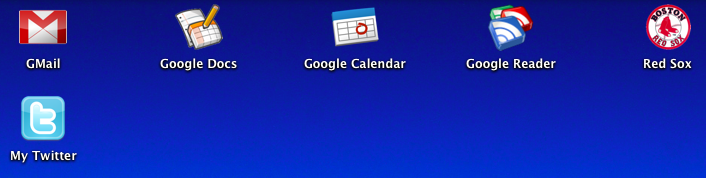
Think of it this way.  Perhaps you use GMail as your primary email or even Google Calendar?  How about Playlist.com and the standalone music player?  Prism and the Firefox add-on Prism for Firefox make it easy to "isolate" these web sites as "apps" so you can quickly and easily access them.  In the following screenshot you can see how I've actually made several "apps" on my desktop, each of which use Prism to launch a specific web site for quick and easy access.  (yes...I'm a die hard Red Sox fan too)


Pretty cool!  Ok...how do I do this?  Go easy on me...


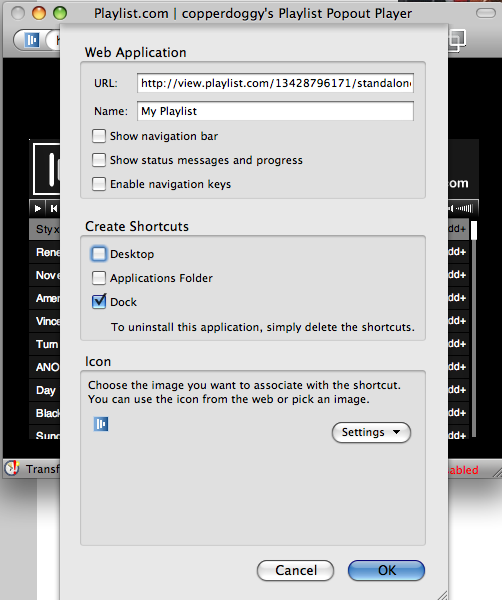
Sure!  It's actually pretty easy.  The easiest method is to use the Prism for Firefox extension...sometimes also referred to as Prism refractor for Firefox.  Use the link below to go to the installation link.  Install just like any other extension and then restart Firefox.  Once you have restarted, you should see a new menu item located under "Tools" that says "Convert Website to Application".  Browse to the site you wish to make into an "app".  In my example, I'm going to browse to www.playlist.com and go to my playlist.  I'll launch the standalone Flash Player.  Once the Flash player is open, I'll click "Tools" > "Convert Website to Application".  The next shot shows what that looks like:


You can choose to add icons to your desktop, dock, or applications folder.  NOTE: This example was created using OS X...other platforms may look a little different and have a less options.  (the Linux version only offers the "desktop" option)

Dude!  That's awesome!  Thanks for the tip!  So...what does it look like in the end?


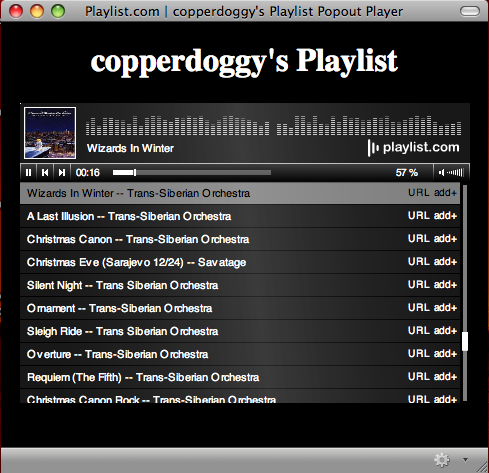
You're welcome!  Here's the shot of my playlist using Prism in all its glory!


Notice the Holiday tunes!  Enjoy the holiday season and let me know if and how you were able to use this tip in the comments!


Prism for Firefox :: Firefox Add-ons
Technorati Tags: , , , , ,

Read more...

Monday, November 24, 2008

Anytime, anywhere...grinding Gears!

It's been a long day, but here I sit at the local salon while watching my teenage son get a haircut (I'm next). Even though there's no wireless here, I can still get on my computer and type. Granted, there are a bazillion word processing programs I can use, but I'd rather use what I'm used to...Google Docs. Now, there's a bit of a quandary. Online apps, offline computer. In many cases, no amount of magic voodo, divine breakdancing, or tin foil will help at all. In fact, I can't even get online using my phone in here. Believe it or not, I can step outside and SEE the cell phone tower, but in this house of hair dryers, scissors, and chemicals that can make even the limpest noodle stand straight up, I can't get online. So, what now? Obviously I've figured it out or you wouldn't be reading this.

Huh? Offline? Online? Which is it? Are you feeling ok?

Actually I feel fine. Ok...maybe I'm getting a little woozy sitting here next to the rack of assorted boutique hair care products. So, I'm offline and writing a blog post using Google Docs. I know, I know! I can hear you already, "Umm, dude? Google Docs is on the Internet. You need to be online to use it." Aha! You're right! *kinda'* Ok, not really...

Get into Gears

The wonderful folks at Google have done it again! They've defied the very laws on online physics! Working with online apps... *gasp*...offline. Egads! What will they think of next? Perhaps someone will invent a small portable music device that holds thousands of songs and allows you to buy those songs...online! Ok, wishful thinking. Seriously though, Google has really come through this time with Gears. Gears allows you to take many apps that might normally work only online and allow you to use them offline. Gears was initially released in May of 2007 and has since become quite a popular application for Web 2.0 afficianados. Gears works with many online applications such as YouTube, Docs, Reader, Picasa for mobile), MySpace (Mail Search), Zoho Writer and Mail, Remember the Milk, and Buxfer. Wordpress recently added support for Gears, to speed up the administrative interface and reduce server hits.

Ok...great...so where's the clutch?

Unlike driving a stick shift, installing Gears is actually very simple. Simply go to the Gears site (http://gears.google.com) and click the link. If you're using Firefox it will install as an extension (it doesn't get much simpler than that) simply click "Install".

Whee! Offline computing! Great! Now how soon before that little music player thingy comes along?

Get Gears. Sync up your documents and you'll be editing and creating regardless of your internet connection. No more switching to other word processing programs just because you're offline. Let us know all about the awesome ways you've found to use Gears in the comments...

Read more...

Saturday, November 22, 2008

What are your fave Firefox extensions?

Read more...

Friday, November 21, 2008

My Gmail themes have arrived! Whee!


For a while now I've been using the GMail Redesigned firefox extension to dress up my GMail...and it has worked great. BUT I was getting kinda' tired of it. Today the Google gods blessed me with the new "Themes" tab in my GMail settings. YAY! I now can choose a different theme for my GMail! I know, big deal...but if you use GMail several times a day...having something different to look at is kinda' nice. Just like we all need a change of scenery sometimes, the same can be true in our online scenery as well. Check out your GMail settings...hopefully the Google gods have blessed you as well, if not, hang on...themes will arrive for you shortly.

Read more...

Thursday, November 20, 2008

Firefox and those pesky long URL's

Have you ever had somebody send you a URL to a web site, only it's so long that the mail system has broken it into several lines? I see these on mailing lists all the time -- always followed by a barrage of followups. "I tried to click on it but I just got a Not Found page!" "It didn't work for me either." "Oh, sorry -- here, I'm trying again." "No, still doesn't work." "Why don't you use TinyURL for it?" I see that happen all the time -- particularly on mailing lists full of Apple Mail and Outlook users, the two mailers most notorious for breaking long URLs. It always makes me laugh -- as a Firefox user, I'm immune to this problem. Even if a URL spans three or four lines, it's no problem in Firefox

Read on....find out how!

LinuxPlanet - Tutorials - Why Firefox Rocks: Great Firefox Tricks, Part IV - The Plague of Ridiculously Long URLs

Read more...

Wednesday, November 19, 2008

GMail themes are coming!


The folks over at the Official GMail blog have announced that GMail themes are on the way in the next couple of days! I've really been waiting for this. I use GMail several times a day and the default theme is pretty "spartan". I'm looking forward to being able to dress things up and brighten at least one part of my day! Keep a look out for the new GMail themes coming to an inbox near you! You'll see a new "themes" tab in GMail's settings...enjoy!


Official Gmail Blog: Spice up your inbox with colors and themes

Read more...

Be a nuggethead...subscribe!

You! Yes you! Join us now!

  © Blogger template Blogger Theme by Ourblogtemplates.com 2008

Back to TOP