Support this site!

Showing posts with label internet. Show all posts

Tuesday, December 16, 2008

10 Unique Desktop Wallpaper sites you gotta' see!

Hey!  If you're at all like me, you spend a little time each week tweaking your computer desktop by cleaning it up a little and changing the decorations.  I'm always on the lookout for cool new desktop wallpapers.  Recently I've stumbled upon a few new sites that have prompted me to share this article with you.  I'll also share some of my old favorites.

Ok...I've got the glue, the brush and my old overalls...where do we start?

Umm...ok....  Hey!  Put the wallpaper paste down!  Quit eating it!  It says "wheat paste", but that's no reason to eat it!  Yuck!  I'm talking about your COMPUTER desktop!  Ok.  Now, let's check out some cool sites.


Interfacelift.com

This one is my favorite.  I use this site quite a bit and my students do as well.  Good clean high quality wallpapers for everyone.  My only beef with the site is I wish I could see more wallpapers at a time, but I can live with it.  They have wallpapers for nearly every screen size.  Interfacelift also features icons and themes as well!  The icon sets are very nice.  One really great thing I like about this site is the ability to download "mobile device" wallpaper.  They feature wallpaper sizes for the Nokia n800/810 Internet Tablets, the Apple iPhone, Sony PSP, and ordinary cellphones.  Gotta' admit, that's pretty cool!  Check out Interfacelift here!


Caedes Desktop Backgrounds

You can get lost in this site.  There are so many wallpapers that you can spend days looking around trying to find the right one.  Luckily the site is broken down into categories and you can sort by screen size and shape.  the illustrations range from artistic fantasy to photographs...and everything in between.  Check out Caedes Desktop Backgrounds here.


DualScreenWallpaper.com

Are you one of the lucky folks who spend your days gazing at a large desktop that spans two or more monitors?  If so, you've probably wondered how you could get wallpaper that "makes sense" on a multi-screen setup.  Well, now you can!  Dualscreenwallpaper.com has just what you may be looking for.  They have sizes ranging from ultra-huge to a modest 1280x800.  Go to dualscreenwallpaper.com for more details!


GraffitiWallpaper.com

This site is amazing.  In case you haven't figured it out, I don't go for the typical movie/celebrity/same wallpaper everyone else has type of web site.  I'm looking for more unique wallpapers and sites.  Graffitiwallpaper.com fits the bill.  The site is very well laid out and easy to navigate.  The name kinda' implies that this site is all about graffiti, but that's not the case.  There are some "graffiti" images, but most of the images are simply animals, landscapes, food, and other unique objects. Check out the site here.


Customize.org

I had to add this one simply due to the name and the sheer number of wallpapers to choose from.  Customize.org features over 15,000 wallpapers for you to choose from.  There's something for everyone.  This site is primarily user driven in terms of submissions and ratings.  You can even select wallpapers according to a color scheme!  Customize.org Wallpapers


N-Design Studio

If abstract designs from original artists are your thing, then check this site out!  N-Design Studio has a small, yet awesome, selection of images created by some very talented artists.  Check it out!


Veer

Similar to N-Design Studio, the Veer site offers a moderate selection of really cool wallpapers that seem to invoke a "retro" feeling that harkens back to the 70's and Peter Maxx.  If you're a fan of active abstract art or a mix of digital photography and graphic arts...check this site out.


IW

I'm a fan of 3D graphic arts.  This site is really cool.  The artists are very talented.  Although the selection is small, the graphics are so well done that it's worth a look.  Go here to see what I mean.


David Lanham

David Lanham is very talented (and busy) grahic artist.  He has several of his works posted for all to enjoy.  I find many of the illustrations on the site to be kinda' like "cartoonish abstract" for lack of a better description.  This is one of those sites you should plan to spend a few minutes on.  I found myself clicking link after link just trying to see what the next one looked like.  Click the icons on the left side of the page to find the wallpapers.  (confession:  I downloaded the snowman one *the cherry icon*)  Check out David Lanham's wallpapers here.


wallpapr

Wallpapr leverages the power of Flickr, the popular photo site, for gathering thousands of unique wallpapers in one spot.  You can browse as little as 20 or as many as 100 at one time.  The selection is HUGE.  You'll have fun browsing this one.  Wallpapr


So...now that I've given you some great sites to browse, hopefully you can redecorate that ugly desktop you've been staring at for a few months.  Time for change!  Enjoy!  Hey!  If you have a fave wallpaper site that isn't featured here...share it in the comments!

Read more...

Wednesday, December 10, 2008

Show your parents, friends, and co-workers how to "Google" it

  You know you have all had to do it.  What?  Show folks how to "Google" something.  You try hard not to make people feel silly, but sometimes it's unavoidable.  Now there's a web site that can take care of all of that for you.

Yeah!  I get sick and tired of people asking me too many questions especially when they could just "Google" it....tell me more!

Finally someone came up with a way to deal with this annoying behavior.  It's a site called Let Me Google That For You.  If you've had enough...use this fun, and a bit "snarky", site to teach them how to "Google it" themselves!  The site is very easy to use.  You simply enter the search term, click the Google Search button, and a link shows up at the bottom that you can copy and send to your friend, relative, or co-worker.  It will display an animation walking them through the search and then it actually displays the search results.  Hopefully, this will help you get some of those annoying folks off your back.  After all, using Google is simple and should be something everyone knows how to do.  :-)

Let me google that for you

Read more...

Tuesday, December 9, 2008

5 Google Docs Templates for Xmas!

Hey!  Google Docs is not only convenient for working online and making life easier...it can also help you with preparing for the holidays!  Google Docs templates are useful every day, but here are some that are particularly useful for this time of year!  Check 'em out! 

Top 5 Google Docs Templates for Christmas


, , , , ,

Read more...

Monday, December 8, 2008

ClassMarker "The online test generator"


The ClassMarker website is a professional online quiz maker for use in schools and organizations.  The website is simple to use and an effective way to administer quizzes directly from your website or emails.  You can randomize questions, have quiz results emailed to you, and create all different types of questions like true/false, multiple choice, and fill in the blanks.  ClassMarker has a free and a paid version.  The paid version offers more features such as the ability to add feedback, removal of advertising, and priority email support.

Try an online quiz here!


Create online quizzes free quiz maker Online testing ClassMarker

Read more...

Friday, December 5, 2008

Share files and photos, create backups...all in a FLASH!

Imagine this scenario...

You have an awesome movie that you want to share with your friends.  You think, "I could email it to them!"  Whoops!  Your email provider has a 10mb limit for attachments.  Dang!  Now what?  Hmmm...

Enter...Drop.io

Drop.io is the simplest way to share files, photos, and more online!  Check out the video below and I'll show you how it all works!


Visit drop.io and start sharing your files and photos!  Click below!

drop.io

Read more...

Tuesday, December 2, 2008

Making web pages into "clickable" apps

Good day everyone!  Today I'm going to show you how you can make any web page into a quickly accessed application on your desktop, dock, or other launch panel.

Ok...let's get on with it!  Ooh!  Is that a rainbow I see?


Actually no.  Yes...it's Prism...not the triangular glass thingy, but rather, the good folks from Mozilla have created an excellent project called Prism that allows users to create "mini-browsers" specifically set up for individual web pages. 

From the Mozilla wiki page:

Prism is a simple XULRunner based browser that hosts web applications
without the normal web browser user interface. Prism is based on a
concept called Site Specific Browsers (SSB). An SSB is an application
with an embedded browser designed to work exclusively with a single web
application. It doesn’t have the menus, toolbars and accoutrements of a
normal web browser. Some people have called it a "distraction free browser"
because none of the typical browser chrome is used. An SSB also has a
tighter integration with the OS and desktop than a typical web
application running through a web browser.

Ok...wonderful.  So what?  How does this help me?

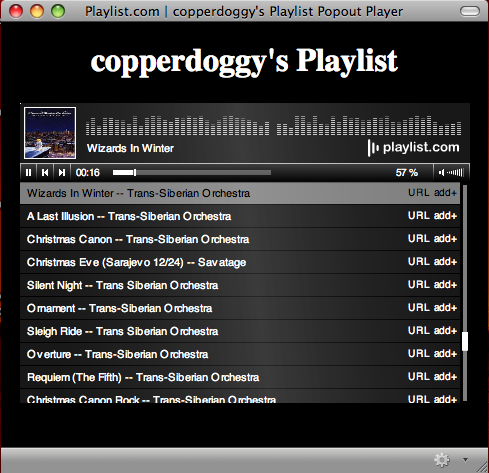
Think of it this way.  Perhaps you use GMail as your primary email or even Google Calendar?  How about Playlist.com and the standalone music player?  Prism and the Firefox add-on Prism for Firefox make it easy to "isolate" these web sites as "apps" so you can quickly and easily access them.  In the following screenshot you can see how I've actually made several "apps" on my desktop, each of which use Prism to launch a specific web site for quick and easy access.  (yes...I'm a die hard Red Sox fan too)


Pretty cool!  Ok...how do I do this?  Go easy on me...


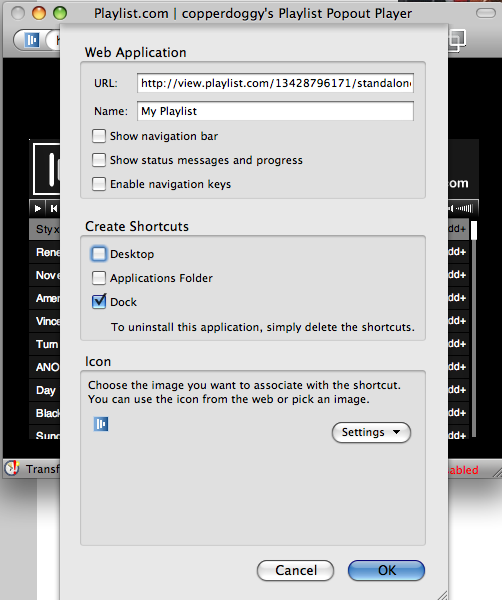
Sure!  It's actually pretty easy.  The easiest method is to use the Prism for Firefox extension...sometimes also referred to as Prism refractor for Firefox.  Use the link below to go to the installation link.  Install just like any other extension and then restart Firefox.  Once you have restarted, you should see a new menu item located under "Tools" that says "Convert Website to Application".  Browse to the site you wish to make into an "app".  In my example, I'm going to browse to www.playlist.com and go to my playlist.  I'll launch the standalone Flash Player.  Once the Flash player is open, I'll click "Tools" > "Convert Website to Application".  The next shot shows what that looks like:


You can choose to add icons to your desktop, dock, or applications folder.  NOTE: This example was created using OS X...other platforms may look a little different and have a less options.  (the Linux version only offers the "desktop" option)

Dude!  That's awesome!  Thanks for the tip!  So...what does it look like in the end?


You're welcome!  Here's the shot of my playlist using Prism in all its glory!


Notice the Holiday tunes!  Enjoy the holiday season and let me know if and how you were able to use this tip in the comments!


Prism for Firefox :: Firefox Add-ons
Technorati Tags: , , , , ,

Read more...

Monday, December 1, 2008

Open Source Twittering! SPAZ twitter client is awesome!

Ok, I admit...I'm a Twitter user.  I write a lot of meaningless drivel for all to follow throughout the day.  It's my way of sharing my life with all of you (who are interested) and also keeping abreast of the latest news and "goings-on".  (My twitter name is "dtrask")  Twitter.com is easy enough, but a tad cumbersome when trying to work on other things.  Keeping a web page open and refreshing it every now and then is simply not practical.  Problem solved...enter the Twitter clients!  There are many Twitter clients out there and they run on all different sorts of platforms.  The most popular ones such as Twhirl and Snitter, just to name a couple, all run on Adobe Air.  They work great, but are not open source.  Also...as a recent Twhirl user, one of my pet peeves is the inability to scroll down very far into my history of tweets from others.  Sometimes I don't get on for a while and want to check back several hours or even several days to see what my friends have been up to.  Well...the other day I stumbled upon Spaz.  The name alone takes me back to high school and the days when we used to tell people, "Hey...don't "spaz" out!"...or "She's such a total "spaz"."  Spaz is an open source twitter client that simply ROCKS!  I love it.  It works on Windows, OS X, and Linux and is simple and easy to use.  It's also customizable for those who wish to tinker a little.  You can write your own CSS files to change just about anything.  There are also some CSS files already written for you that can be used to make changes in Spaz's appearance.  Fed up with some of the other Twitter clients?  Want to give something else a try and support a cool Open Source project?  Download Spaz!

Spaz: An Open-Source Twitter Client for Mac OS X, Windows and Linux

Read more...

Thursday, November 27, 2008

Tryptophan and blogging on the Nokia n800

Here I sit after stuffing myself with a ton and a half of turkey, cranberry sauce, and other assorted holiday goodies trying to write a blog post while fighting off the effects of tryptophan.

*Zzzzzzz...oh...umm...what did you say?

WAKE UP! I'm writing here! Ok...as I was saying, I'm just finishing up with my family Thanksgiving meal. I've decided that I owe you all at least a few words. These past few days I've been blogging about Thanksgiving and how you can make your life easier while you travel especially when it comes to technology. Well, right now I'm at my sister-in-laws house way out in the "willy-wacks" where there is no wireless internet and barely any cell phone service. So, what am I using? I'm using a Nokia n800 with a bluetooth keyboard and internet via my bluetooth phone for posting this article. I'm sitting here at the dining room table listening to my wife and her sisters share gossip, memories, and gripes. Im pretending not to listen while recording all the things they're saying about other family members. *Tee hee hee* OK...just kidding. The Nokia n800 Internet tablet is a great way to be able to get online from wherever you may be. Unlike a SmartPhone, the n800/810 is NOT a phone it is an internet device designed for getting online, browsing the internet and using several Web 2.0 technologies. Right now Im listening to "100 Years" by Five for Fighting using the incredible program, Canola (which is remarkably similar to Front Row on Mac OS X) while using XJournal to type this post. Once I finish I will connect to the Internet via my cell phone (bluetooth) and post this article. While connected I'll take a moment and check my email and reply to anything that might be important.

Wait a minute! What about those cool netbooks?

The new netbooks, from companies like ASUS, MSI, HP, Dell and others, are fantastic portable computers, however, they are still at least 10 inches wide or basically the size of a large paperback book. An Internet tablet is the size of a large PDA and easily packed in a purse or jacket pocket. In the picture you'll see a folding bluetooth keyboard, but bear in mind that I have an n800. The n810 has a slide out keyboard similar to many newer cell phones designed for texting. Once I get an n810 (c'mon Santa....hint...hint) I may be able to forgo the keyboard. There is a very good onscreen keyboard, but it's a little slow for banging out a blog post while under the influence of tryptophan.

Ok, what else can they do? Can they give me directions?

Actually yes! The n810 comes with GPS capability! I often use my n800 when flying. The screen is quite large for a device this size and is perfect for viewing movies while flying around the country. The battery life is excellent (I can get at least 2 good length movies out of one charge), however the battery is a standard Nokia cellphone battery. I bought a spare for about $35 and keep it charged to use as a backup.

Movies! Did you say movies?

Yep...I did. Since the n800/810 will accept an SD or mini-SD card (n810) you can easily take along several movies and/or tunes for staying occupied on long trips or while working. I use the open source program, Handbrake, to rip my own DVD's to my computer and then transfer them to my SD card for use in my n800. Handbrake is free and very easy to use. There are many programs available for the n800/810 for playing music and video. I tend to rip my movies in mp4 format, so I use Canola or MediaPlayer to view the movies. My music is usually in MP3 format and I normally use Canola for playback. The n800/810 will recognize many formats (even OGG). Ive had my Internet Tablet for a couple of years now and have learned a lot through experimentation.

Wait! Isnt this a Linux device? Do I have to be a geek?

No...the n800/810 is "point and click" simple. Adding programs is as simple as downloading and installing them with a click or two....OR simply going to the Add/Remove programs dialog and choosing what you want. There are literally hundreds, if not thousands, of programs available. What sets the n800/810 apart from SmartPhones or other PDA's is the fact that it serves up the regular internet, not the stripped down mobile version. Flash based apps work great! Youtube works fine and is integrated in Canola.

Ok...so why would I want this thing? Oh yeah...movies...

Yes, the movies are nice, but more importantly the n800/810 is truly the "Internet in the palm of your hand". Netbooks are wonderful, but they are still laptops. The Nokia devices are not laptops. I love my n800 and covet the n810. It has saved my life many times. Check them out at your favorite electronics retailer or online at...Amazon...TigerDirect...NewEgg...Nokia

Read more...

Wednesday, November 26, 2008

Hunting, Technology, and the elusive Bambi

In much of the US we are in the midst of what is know as huntin' season.  Yep.  Hundreds of thousands of people around the US, a large part of them male, wander into the woods and fields in search of elusive prey.  I began to ponder about how technology has aided or hindered this annual rite of passage.  I think I have a few things figured out...many from personal experience.

Technology device #1, the common cell phone (the one you left in the truck)


It's a beautiful cold autumn day.  You and your buddies have just embarked on a trek through the woods in search of an unsuspecting deer.  You plunge into the brush walking alongside your buddies...eventually spreading out and keeping each other in sight.  You walk for 10 minutes over hills, stumps, and fallen trees when you look to your right and realize you can't see your buddy any more.  So, you reach into your pocket, pull out your cell phone, glance at the time and realize you've actually been walking for almost 3 hours!  Whoops!  You also look around and realize that you've probably been walking around the same hill for most of that time.  OK, time to find out where you are in relation to your buddies.  You place your rifle into the crook of your arm, pull out your cell phone and dial your buddy.  While you have the phone up to your ear, a deer leaps out from behind an evergreen and bounds off into the wilderness.  The conversation goes something like this..."Hello?"  "Where are you?"  "Umm, I'm standing next to a big birch tree.  Why?  Where are you?"  "Uh...I'm standing next to a creek.  Did you see a creek anywhere near you?"  "Yep, crossed one about an hour ago!"  "Really?  What color was it?"  Hilarity ensues...shots get fired into the air and the mighty hunters eventually figure out that they are less than 200 feet apart.

Technology device #2, the handheld GPS device (the one with the dead batteries)


It's a cool blustery day when the mighty hunter ventures off into the wilderness alone armed with little more than his wits (oh boy), his rifle, and his new GPS unit.  The hunter walks for miles into the unknown placing his trust in technology that he'll be able to find his way back.  It's been a long day, the hunter decides that it's probably time to head back.  He reaches into his pocket, fumbles around until he finds his new GPS unit...excited at the prospect that his new toy will point him home...when panic sets in.  Why?  The batteries are dead.  Lifesaving technology has a tendency to be rendered useless without electricity.  Whoops!

How about this scenario?  The mighty hunter and his buddy set off, each with his own portable GPS unit.  A couple of hours later, the two hunters make contact by cell phone...each one asks, "Where are you?"  The first hunter replies, "I'm at waypoint 4 located at 45.5 north and 23.2 west."  The second hunter asks, "OK what button do you push?"  Moments pass...shots are fired into the air and the mighty hunters realize that the GPS is useless.

Technology device #3, the Internet (at home, of course)

The mighty hunter prepares to stumble off into unknown territory secure in the knowledge that he is armed with the latest satellite photos from Google Earth showing all the intricacies of the area landscape.  The little pond over here...the bog over there.  Oh!  Wait!  What's that?  It's a deer standing in the middle of a field photographed by a satellite hurtling around in space high above the earth.  The hunter hurriedly gets his things together, gets out of the truck and heads toward the field.  Hmm...no deer.  Thinking the deer has possibly moved toward the cutting on the edge of the field he begins to circle around the field in hopes of cutting off the escape.  The hunter stumbles into a thicket filled with thorny brush.  Muttering and cursing, he hauls out his trusty Google Earth printout and notices that neither the cutting nor the thicket are anywhere to be seen.  When the fog clears from the hunters mind he notices the date of the image near the bottom of the printout.  April 3rd, 2004  Whoops again!  Little late on that deer...

Technology device #4, the Smartphone/PDA

After a long day of walking through the puckerbrush carrying a long metal rod loaded with tiny little rockets, the mighty hunter emerges from the wilderness in search of food and drink.  While sitting in his truck, the hunter reaches for his Smartphone, ponders the irony that the deer have once again proven to be smarter than he is, and then proceeds to use his portable connection to the Internet to make plans to hook up with his buddies at the local watering hole.  Once again, hilarity ensues, as 4 grown men spend nearly an hour texting and calling one another trying to decide where to grab a bite to eat.

OK smartypants!  There's gotta' be something useful here for hunters.

Actually a loaded rifle makes hunting a little easier.  Seriously, cell phones, GPS devices, and even Google Maps/Earth can really help out when planning your next hunting trip.  A little common sense goes a long way too.  Charged batteries (even spares), a plain 'ol compass (just in case), a realization that you DO NOT control the Google Earth satellites in real time, and your buddies cell phone number can always help.  Google Earth can actually be a great help when hunting in an area where you're not too familiar with the terrain, but be aware that many satellite photos can be a few years old...things change over time, especially out in the woods.  GPS devices can be a fantastic way to keep tabs on your location as well as that of your buddies.  Make sure you read the manual and become completely familiar with your device BEFORE you head out.  Last but not least, common sense.  Technology is wonderful, but it cannot replace the human mind, for most of us..at least.  So, next time you're out in the woods carrying a long metal "firestick" while Bambi is giggling in the underbrush as you pass by, remember have fun and be safe.

David Trask writes for Flubbernuggets.com and is keenly aware that Bambi is much smarter than he is.  Hardly an "avid" hunter, David enjoys long walks in the woods while carrying heavy crap and stumbling through the puckerbrush.

Read more...

Tuesday, November 25, 2008

Surviving the Thanksgiving Turkey debacle

They say you can find almost anything online. A husband, wife, new car, new home, child to adopt, (still don't know if you can have a baby online yet), food, and all the assorted gadgets you could ever need. More importantly there is a wealth of information online. Granted, 99% of it is crap, but some of it is actually worth knowing.

How to not burn the turkey is something worth knowing


As we approach the big turkey day I thought I might share a little information on cooking a turkey. It's not every day that most of us cook a giant bird the size of a household dog (No! Put Fifi down! Cut that out!). It's also not every day that we invite several people to our house to sample our cooking. For many of us...that's a GOOD thing.

Ok...buying 42 frozen TV dinners with turkey and stuffing is a tad expensive don't you think?


I'm sure the thought has crossed your mind. Go to the supermarket, buy 40-50 Lean Cuisine or Healthy Choice frozen turkey dinners and scrape them out onto a big plate. Let me clue you in on a little secret...it's ALL white meat with NO drumsticks. Folks will catch on very quickly. Fights will ensue, family members will shun you, and your status in Uncle Earl's will could change drastically.

I'm scared! What shall I do?

Have no fear! Remember how I said you can find anything online? Well, there are life-saving instructions for cooking a turkey! Yay! (waiting for the applause to die down) Who'd have thought there'd be a website called "www.howtocookathanksgivingturkey.com"? Well there is, and it is full of great information on how to prepare that big bird for the feast. So, why am I telling you this today? Because you gotta' get started! Seriously! Cooking the turkey requires careful planning and timing, especially if it's frozen. So...click on the link below and rest assured that even the least knowledgable turkey cooks can pull off a great thanksgiving meal. Enjoy! (and good luck) ;-)

HOW TO COOK A TURKEY | HOW TO COOK A THANKSGIVING TURKEY

Read more...

Saturday, November 22, 2008

What are your fave Firefox extensions?

Read more...

Friday, November 21, 2008

My Gmail themes have arrived! Whee!


For a while now I've been using the GMail Redesigned firefox extension to dress up my GMail...and it has worked great. BUT I was getting kinda' tired of it. Today the Google gods blessed me with the new "Themes" tab in my GMail settings. YAY! I now can choose a different theme for my GMail! I know, big deal...but if you use GMail several times a day...having something different to look at is kinda' nice. Just like we all need a change of scenery sometimes, the same can be true in our online scenery as well. Check out your GMail settings...hopefully the Google gods have blessed you as well, if not, hang on...themes will arrive for you shortly.

Read more...

Thursday, November 20, 2008

Firefox and those pesky long URL's

Have you ever had somebody send you a URL to a web site, only it's so long that the mail system has broken it into several lines? I see these on mailing lists all the time -- always followed by a barrage of followups. "I tried to click on it but I just got a Not Found page!" "It didn't work for me either." "Oh, sorry -- here, I'm trying again." "No, still doesn't work." "Why don't you use TinyURL for it?" I see that happen all the time -- particularly on mailing lists full of Apple Mail and Outlook users, the two mailers most notorious for breaking long URLs. It always makes me laugh -- as a Firefox user, I'm immune to this problem. Even if a URL spans three or four lines, it's no problem in Firefox

Read on....find out how!

LinuxPlanet - Tutorials - Why Firefox Rocks: Great Firefox Tricks, Part IV - The Plague of Ridiculously Long URLs

Read more...

Monday, November 17, 2008

Dabbleboard (the online whiteboard)


The world of Web 2.0 is pretty incredible. Sometimes there's something that comes along that really ROCKS! Dabbleboard is one of those things in my opinion. Have you ever really wanted to share a drawing live with a co-worker? Ever needed to collaborate on some plans or a drawing? Now you can! ONLINE! Collaborating on a project drawing is a cinch. Check it out for yourself! Leave a note in the comments and share your drawing...

Dabbleboard - Online whiteboard for drawing & team collaboration

Read more...

Be a nuggethead...subscribe!

You! Yes you! Join us now!

  © Blogger template Blogger Theme by Ourblogtemplates.com 2008

Back to TOP